
What it does

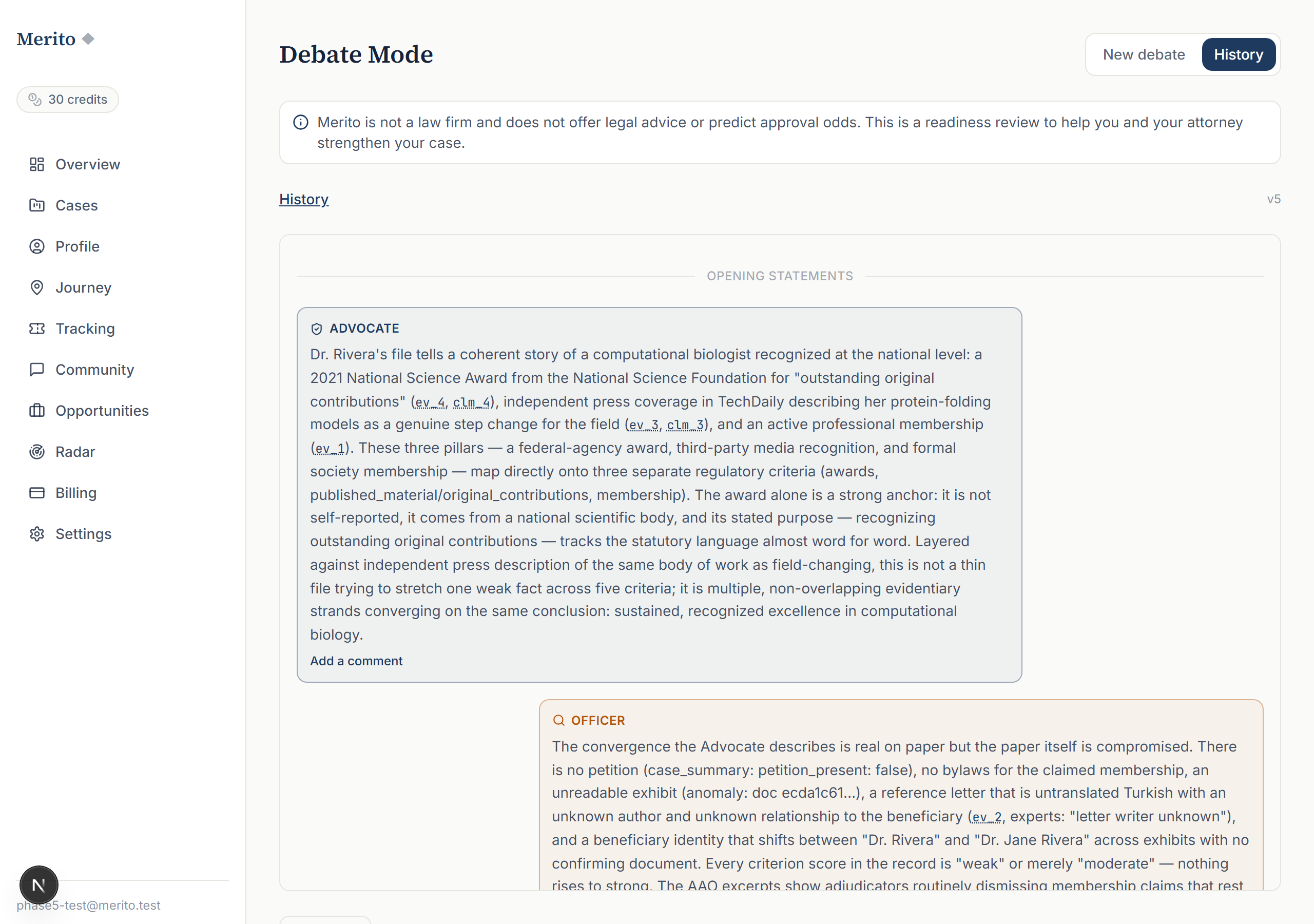
- Streams a real turn-by-turn exchange between an Advocate voice (arguing the strongest honest case, building only on evidence in your file) and a skeptical Officer voice (attacking documentation quality, independence, and the totality reading) — opening statements, then three rounds.
- Closes every session with a Judge's synthesis, structured into four fixed sections: arguments that held, arguments that fell, the pivot, and what would settle it — not a single blended reaction.
- Lets you re-run the debate after adding evidence and compare Judge syntheses across versions, so you can see exactly what changed since the prior run.
When to use it
Debate Mode sits in the Stress Test stage of the Case Journey (journeyStageMeta.ts), alongside Officer Simulator and Devil's Advocate — the stage where you pressure-test a case that's already reasonably built, before filing.
- Before: build up your Case File with real evidence first (Evidence Binder, Citation Context Analyzer, Expert Finder) — Debate Mode argues from whatever is already in your file, so a thin file produces a thin debate.
- After: if the Judge's synthesis surfaces a weak criterion, Devil's Advocate gives you a longer written brief attacking the same weaknesses in more depth, section by section. If you later face a real denial or NOID citing similar grounds, Denial/NOID Response picks up from there.
Before you start
- Input: none beyond an existing, ingested case — you pick a claim or criterion from your Case File, not from typed text.
- Case File prerequisite: yes — the case must be ready (documents ingested) before you can start a session.
- Typical time: a few minutes to watch the full streamed exchange (opening statements plus three rounds), plus the Judge's synthesis at the end.
- Credit cost: 3 credits per debate session (Pro plan or credits).
Step by step
Open Debate Mode from your case. Go to your case's Debate workspace (
/dashboard/cases/<id>/debate).Review the intro screen. It explains the three roles: the Advocate (a skilled filing attorney arguing the strongest honest case), the Officer (the skeptical adjudicator voice), and the Judge (a neutral senior reviewer who synthesizes plainly).
Optionally turn on deeper analysis. A checkbox lets you use Opus instead of the default model for a more thorough exchange — this doesn't change the credit cost shown.
Start the debate and watch it stream. Opening statements come first, then three labeled rounds: Round 1 (strongest criterion-level clash), Round 2 (documentation & independence), Round 3 (final merits & totality). Each point is tied to a real exhibit tag from your case file.
- Warning: only the case owner can start a new debate — other collaborators with case access can view existing sessions in History but can't start a new one.
Read the Judge's synthesis. Once the exchange ends, the Judge panel appears with up to four sections (see "Reading the result" below) and a closing line.
Export or revisit. Export the transcript to PDF, or open History to review past sessions — the app computes and shows a plain-language "what changed" note when you have two completed sessions on different Case File versions.
- Tip: re-running the debate after adding real evidence, not just editing prose, is what actually changes the Officer's objections — a debate argues from evidence, not from how confidently something is written.
Reading the result
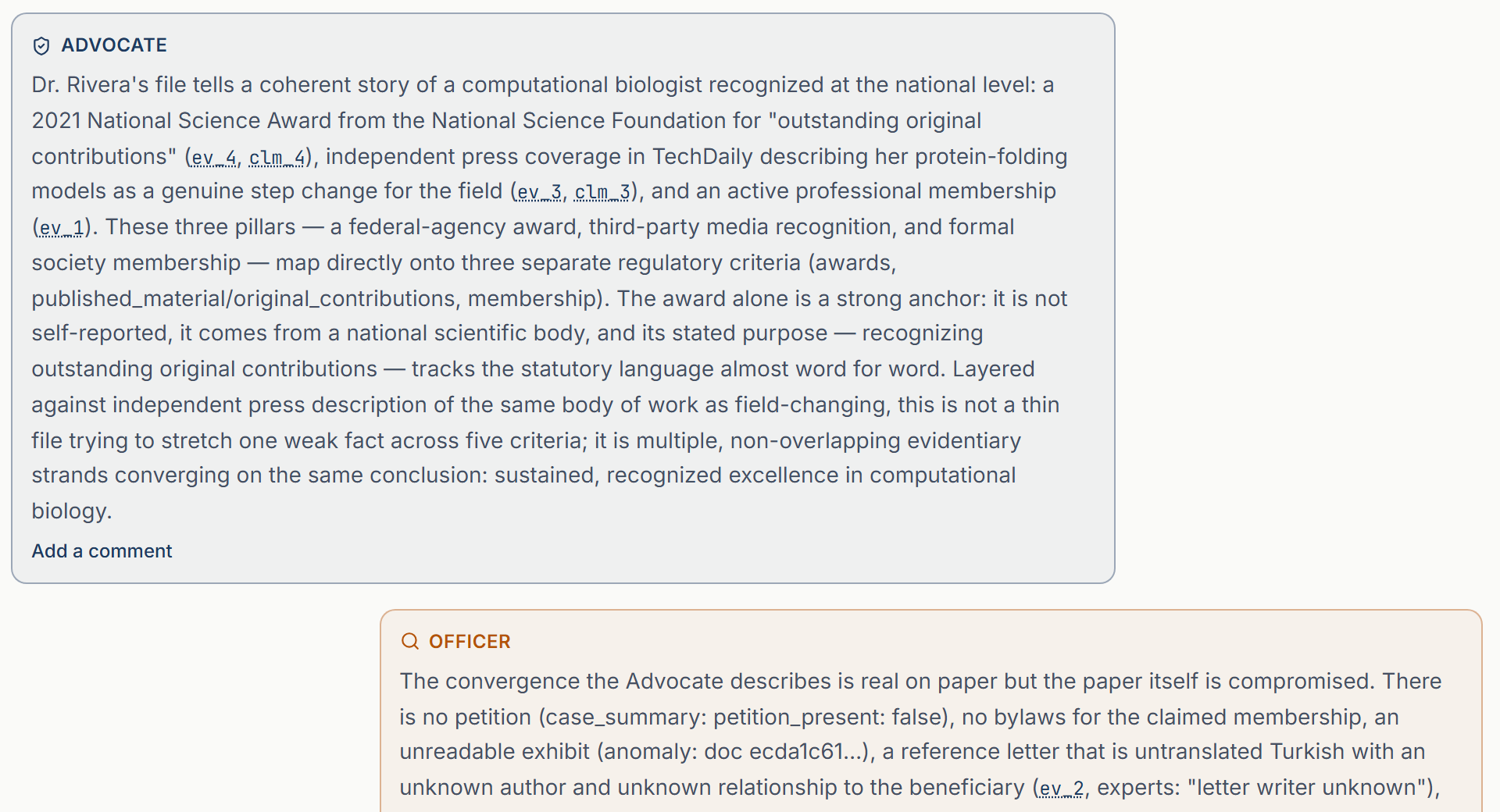
- Advocate — the persuasive-but-honest voice, building only on evidence already in your file.
- Officer — the skeptical adjudicator voice, attacking documentation quality, independence, and the totality reading, but conceding what is genuinely strong.
- Round 1 / 2 / 3 labels — Round 1: strongest criterion-level clash. Round 2: documentation & independence. Round 3: final merits & totality.
- Judge's Synthesis — the closing structured verdict, with up to four sections:
- Arguments that held — points the Advocate made that the Officer didn't successfully attack.
- Arguments that fell — points the Officer's objections actually defeated.
- The pivot — the single moment or fact the Judge identifies as decisive in the exchange.
- What would settle it — concrete next steps that would resolve the debate's open questions.
- Watermark — every session carries "SIMULATED ADVERSARIAL EXERCISE — EDUCATIONAL, NOT A PREDICTION," because that's exactly what it is.
- "What changed" note (History tab) — appears once you have two completed sessions on different Case File versions, naming the specific exhibit or change that shifted the Officer's posture.
Free vs Pro for this tool
- Debate Mode is not available on the Free plan at all — it's one of the tools explicitly listed under
plans.pro.features_json(debate_mode). - A 7-day Pro trial includes 40 credits — at 3 credits per session, that's enough for over a dozen debates during the trial window, shared with every other Pro tool you also run.
- The trial checkout collects a card up front (a standard Stripe subscription checkout with a trial period, not a card-free trial), but cancellation is straightforward — cancel anytime from Settings before the trial ends and you won't be charged. Start your free trial to run your first debate.
Ready to put this to work on your own case? Start free — no credit card required, or start your free trial to unlock the full Pro toolset. For more background from Merito's parent site, see real EB-1A, O-1A, and EB-2 NIW case studies from EB1 Mentor.
Common mistakes
- Running a debate before the file has real evidence. The Advocate can only argue from what's actually in your Case File — a thin file produces a thin, easily-defeated exchange, which tells you less than you'd think.
- Editing prose instead of adding evidence, then re-running expecting a different result. The Officer's objections respond to documented facts, not writing style — the re-run comparison is designed to show exactly this distinction.
- Treating the Judge's verdict as a prediction of a real officer's decision. The watermark says it plainly: this is a simulated adversarial exercise, educational material for you and your attorney, not a legal assessment.
- Forgetting only the case owner can start a new session. If you're a collaborator and the start button seems missing, that's the owner-only gate working as intended, not a bug.
Frequently asked questions
How is Debate Mode different from Officer Simulator?
Officer Simulator streams one officer's read of your document, live, as it processes it. Debate Mode is a structured two-sided argument (Advocate vs. Officer) with a third-party Judge's verdict — a genuine exchange, not a single reviewer's reaction.
How is it different from Devil's Advocate?
Devil's Advocate is a one-sided adversarial brief (only the attack, written out at length). Debate Mode is two-sided and turn-based, ending in a structured verdict rather than a long-form brief.
Can I choose which criterion gets debated?
The debate argues your case's strongest claim as reflected in the Case File; you don't hand-pick a transcript topic before starting.
What does "Opus" do?
It's an optional deeper-analysis model toggle on the intro screen — it doesn't change the credit cost, only the depth of the model doing the arguing.
Can I compare two debates?
Yes — once you have two completed sessions run on different Case File versions, the History tab shows a plain-language note on what changed between them.
Is the transcript exportable?
Yes, as a PDF, from either a live session once it's done or from History.
Merito is not a law firm and does not offer legal advice or predict approval odds. This is a readiness review to help you and your attorney strengthen your case.