
What it does

- Drafts a petition section by section — criterion sections, a cover letter arc, and a final merits synthesis — each generated from the case's real Case File and evidence, never from raw uploaded documents directly.
- Lets an attorney revise any selected passage in place with four targeted instructions: Tighten, De-generic, Officer-readability, or Anchor to exhibit.
- Runs an integrity check across the whole draft before export: a petition review, consistency findings, and citation-integrity validation confirming every cited AAO identifier matches a decision actually retrieved for this case.
Important: AI Drafter is genuinely exclusive to attorneys collaborating on a case under a firm's Counsel plan — it is not a personal-plan Pro feature. If you're a petitioner without an attorney attached to your case, this tool won't appear for you at all; see Petition Studio or Evidence Binder for the personal-plan equivalents.
When to use it
AI Drafter sits in the Case Journey's Position checkpoint, alongside Field & Narrative Studio, Evidence Binder, and Petition Studio — one of three paths that satisfy that checkpoint's "drafted" requirement, appearing only for counsel-tier cases. It's most useful once Field & Narrative Studio has settled on a framing and Case Canvas shows the evidence gaps closed — drafting from a settled narrative avoids rewriting sections later.
Before you start
- Access is attorney-only, per case. You must be an active attorney collaborator with edit-tools access on the case, and your firm needs an active Counsel or Counsel Plus plan (or firm credits) — never available to the case's own personal owner.
- A built Case File and linked evidence are the real prerequisite. Sections generate from the Case File and evidence items already on the case, not from documents you paste in directly.
- Cost, per action, in firm credits (drawn from your firm's pool, not the petitioner's personal balance):
- Criterion section: 3 credits
- Cover letter arc: 3 credits
- Final merits synthesis: 3 credits
- Transition bridge: 0.5 credits
- Revise (per passage): 0.5 credits
- Typical time: a few minutes per section to generate and review; a full draft across several sections is realistically a multi-session effort.
Step by step
Open the Drafter from the case. Navigate to the case's Drafter tab. If you're viewing as the case owner rather than the attorney, you'll see a read-only "Shared by your attorney" banner instead of editing controls.
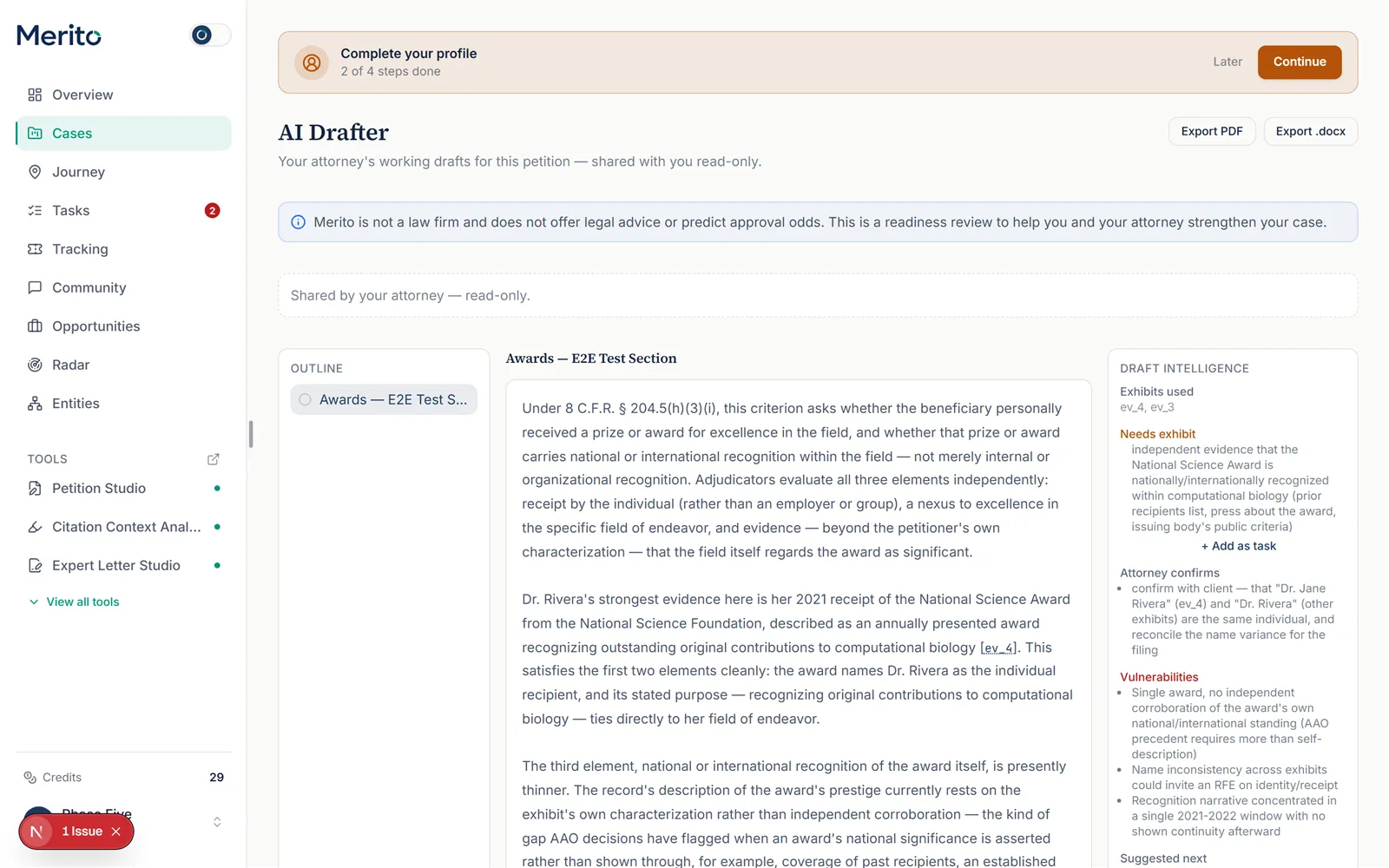 (This is the real, live view a case owner sees — it happens to already have a section drafted in this fixture case, which also illustrates step 3's Draft Intelligence rail below. The interactive authoring controls in steps 2, 4-9 are attorney-only and aren't captured here, since the fixture account used for this guide is the case owner, not an attorney collaborator.)
Add a section from the outline. Choose a section type (a specific criterion, Cover letter arc, or Final merits synthesis) and give it a title, then select Add section.
Tip: Nothing generates until you explicitly select Generate section — adding a section only creates the outline entry.
Generate the section. Optionally add instructions, then select Generate section. Content streams in live. Draft intelligence (observed patterns, exhibits used, evidence still needed, vulnerabilities, suggested next steps) appears alongside once generation finishes.
Revise a specific passage. Select any text in the draft, then choose one of the four revise instructions (Tighten, De-generic, Officer-readability, Anchor to exhibit). Review the proposed revision before choosing Apply or Discard — nothing is overwritten automatically.
Insert exhibit tags and make manual edits. Use Insert exhibit tag… to drop an
[Ex. …]reference at your cursor, or edit the text directly — manual edits save immediately as the section's current content, kept separate from the AI-generated version history.Check version history. Every AI-generated draft of a section is kept as a version, labeled "current" or flagged if that generation produced empty output. Restore any prior version if a revision took a wrong turn.
Run the integrity check before relying on the draft. Select Check this draft to get a petition review, a consistency-findings count, and citation-integrity results — confirming every cited AAO identifier actually matches a decision retrieved for this case.
Warning: A flagged citation means an identifier in the draft wasn't found in the retrieved set for this case — treat it as something to verify or remove before filing, not a formatting nitpick.
Sign off on a section. Once a section is ready, select Sign off. Every section signed off is what feeds the Case Journey's "drafted" completion signal for counsel-tier cases.
Export. Export the draft as PDF or .docx. Every exported PDF carries a "DRAFT — prepared for attorney review; not legal advice and not a filed document" band. Exports may be locked behind a trial gate depending on the firm's plan status.
Reading the result
- Draft intelligence rail — observed patterns (precedent-style argument patterns relevant to this section), exhibits used, evidence that still needs an exhibit, points the attorney should personally confirm, potential vulnerabilities, and a suggested next action.
- Version history labels — "current" (the active version), and a failed/empty-output flag for a generation that produced no usable text (a real, if rare, failure mode worth regenerating rather than trusting).
- Consistency findings count — the number of cross-section or cross-evidence inconsistencies the integrity check found; each carries its own severity.
- Citation integrity — a clean pass reads "Every cited AAO identifier matches a retrieved decision"; a failure lists exactly which identifiers didn't match anything actually retrieved for this case.
- Sign-off state — whether a section is signed off, which is what ultimately marks the whole draft "signed off" for Case Journey purposes.
Free vs Pro for this tool
- AI Drafter has no personal Free or Pro tier — it lives on the firm side, under Counsel ($199/mo, 60 credits/month) or Counsel Plus ($399/mo, 200 credits/month).
- Neither Counsel plan carries a free trial (0 trial days), unlike the personal Pro plan's 7-day trial — don't conflate the two.
- As the petitioner, this tool doesn't apply to your own account — your attorney's firm plan governs access, and you see their drafts read-only if shared.
- Evaluating Merito for your firm? Reach out about a Counsel plan directly rather than looking for a personal-account trial.
Ready to put this to work on your own case? Start free — no credit card required, or start your free trial to unlock the full Pro toolset. For more background from Merito's parent site, see booking a mentorship session with EB1 Mentor.
Common mistakes
- Drafting before the Case File and evidence are actually settled. Sections generate from what's already recorded — drafting against an incomplete Case File means redrafting once evidence catches up.
- Skipping the integrity check before filing. A section can read well and still cite an AAO identifier that was never actually retrieved for this case — the citation-integrity check exists specifically to catch that.
- Treating a generated section as filing-ready without attorney review. Every export explicitly carries a "prepared for attorney review; not legal advice and not a filed document" line for exactly this reason.
- Confusing manual edits with AI-generated versions. Manual edits save directly to the section's current content and don't appear in version history — that history is specifically the record of AI-authored drafts.
- Forgetting sign-off is what completes the Case Journey node. A well-drafted, un-signed-off section doesn't register as "drafted" for journey-tracking purposes.
Frequently asked questions
Can a personal-plan petitioner use AI Drafter?
No. It requires an attorney collaborator with a firm on an active Counsel plan — it's genuinely absent, not merely locked, for a personal-plan case.
Does AI Drafter read my uploaded documents directly?
No — like every Merito tool, it reads the structured Case File built from your documents, not the raw files themselves.
What happens if a generation produces no text?
It's recorded as a failed/empty version in history, distinct from a normal draft — regenerate rather than treating it as a usable version.
Can the case owner (petitioner) edit the draft themselves?
No — the petitioner sees a read-only, "shared by your attorney" view; only the attorney collaborator can generate, revise, or sign off sections.
Merito is not a law firm and does not offer legal advice or predict approval odds. This is a readiness review to help you and your attorney strengthen your case.