
What it does
- Interviews you period by period (Education, Professional Experience, Recognition & Impact, Current & Future Work) about what you actually did, in your own words.
- Turns your answers into evidence candidates: a title, a description, and the criterion codes that evidence could support — flagged if you haven't mentioned documentation for it yet.
- Adds anything you keep straight to your Evidence Binder as an
ai_candidateitem, and — if you said you don't have paperwork for it — creates a task to go find that paperwork.
Most petitioners' strongest evidence isn't sitting in a folder yet. It's a fact they'd mention in conversation but never thought to write down as "evidence." Achievement Miner exists specifically to surface that.
When to use it
Achievement Miner doesn't sit on the main Case Journey path — it's an on-demand utility you open from inside a case whenever your evidence looks thin. The best time to run it is right after Merito Score or Merito Audit shows a weak or empty criterion: pick the period of your life most likely to contain something relevant to that gap, and describe it.
Once you've accepted candidates here, they show up like any other evidence item — in the Evidence Binder, and mapped against your criteria in Case Canvas. If a candidate is missing documentation, its follow-up task feeds your regular to-do list.
Before you start
- You need an existing case. No Case File build, upload, or prior analysis is required — Achievement Miner works from your visa type and whatever you type into the interview, not your uploaded documents.
- Cost: 3 credits per turn. Each period you submit (plus a possible one-round follow-up question) is billed once you submit your answer, on the same pricing tier as RFE Studio. You need Pro plan credits or purchased credits in your balance — it is not included free on the Pro plan's tools list, so every run draws from your credit balance the same way it would for a free-plan user with purchased credits.
- Typical time: 5–10 minutes per period if you write a real paragraph, not a one-liner. Vague input produces vague candidates.
Step by step
Open Achievement Miner from a case. Launch it from a specific project's detail view inside a case — each project (organized by criterion, plus General) is where the trigger lives. The dialog opens with four period tabs across the top.
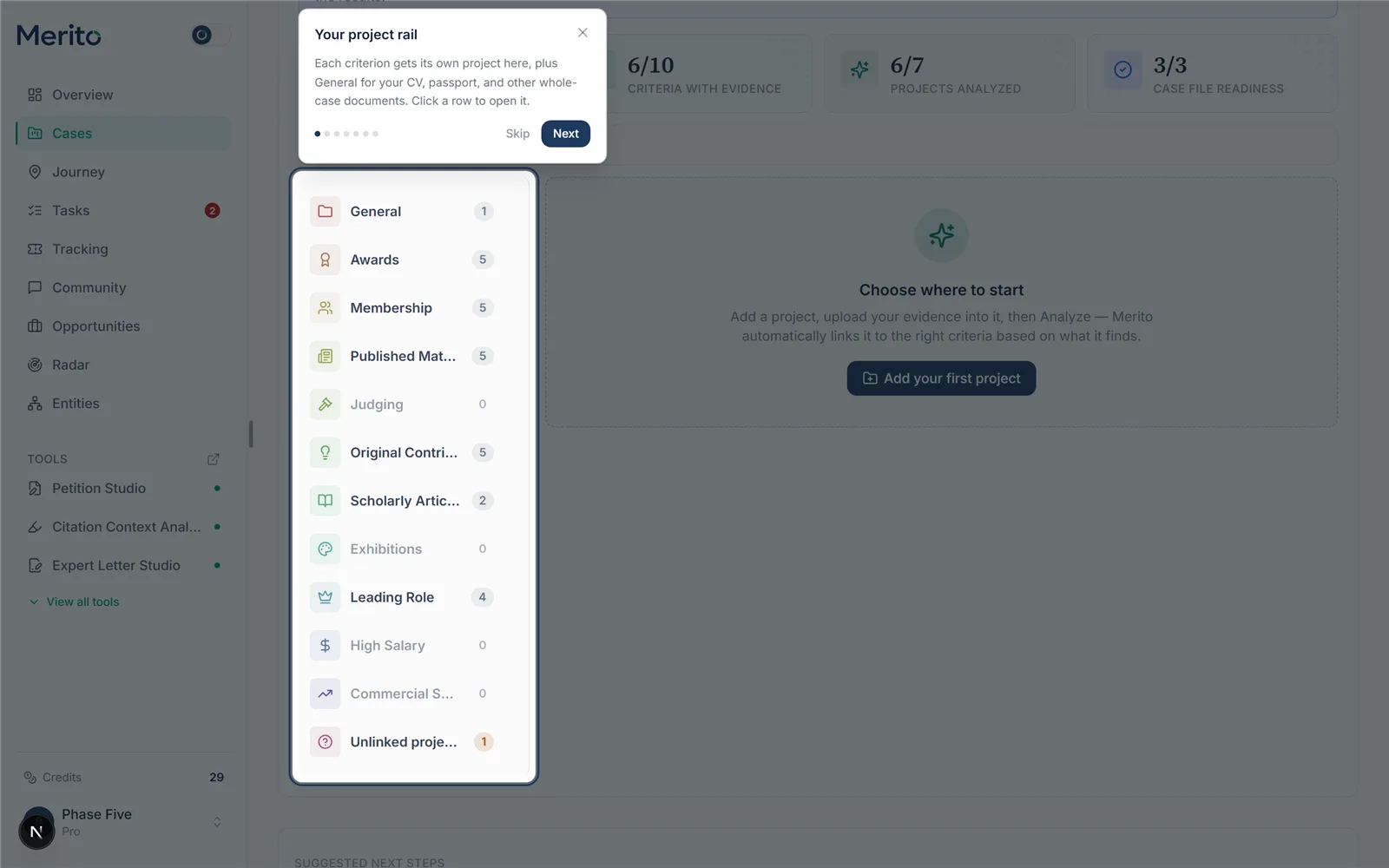 (This screenshot shows the case-level project rail for orientation; the interview dialog itself isn't captured here since opening it and submitting a period is what spends the 3-credit charge — see the note at the end of this guide.)
Pick a period. Choose Education, Professional Experience, Recognition & Impact, or Current & Future Work. Each tab shows a different prompt (e.g. Recognition & Impact asks about "Awards, media coverage, invited talks, judging/peer-review activity, or measurable impact of your work").
Tip: Switching periods clears your draft text for the tab you're leaving — write and submit one period before moving to the next.
Describe the period in your own words. Use the text box. Include dates, specifics, and anything you could point to as proof — the more concrete, the better the candidates. Then select Continue.
Review what it found. Candidates appear under "What we found," each with a title, description, and criterion-code pills. A candidate missing documentation is flagged with "No documentation mentioned yet."
Warning: A missing-documentation flag means exactly that — the interview found no mention of a document. It doesn't mean the achievement is invalid, only that nothing is filed away yet to prove it.
Answer the follow-up, if one appears. Achievement Miner may ask exactly one clarifying question per period (never an open-ended chat). Answer it and select Submit answer to get an updated set of candidates.
Add candidates to your Evidence Binder. Select Add to Evidence Binder on each candidate you want to keep. If it had no documentation flagged, a task ("Find supporting document for: …") is created automatically.
Repeat for other periods, as needed. Come back to any period at any time — there's no limit on how many times you use this tool across a case, only the per-turn credit cost.
Reading the result
- Title / description — the achievement as Achievement Miner understood it from your text, written to read as evidence, not as your original wording.
- Criterion pills — the specific criterion codes (e.g.
awards,judging) this achievement could support. These are candidates, not a guarantee the criterion is satisfied. - "No documentation mentioned yet" — a warning badge, not an error. It means: gather a document for this, don't file it as evidence-in-name-only.
- Added / Adding… — once you add a candidate, its evidence item status is
ai_candidate. It stays that way until you or your review process explicitly confirms or rejects it — nothing here is auto-confirmed.
Free vs Pro for this tool
- Achievement Miner isn't on either plan's included-tools list — Free or Pro — so it always draws from your credit balance rather than being "free to open" the way a Pro-included tool is. A Free-plan user with a purchased one-time credit pack can run it exactly like a Pro subscriber can.
- The 7-day Pro trial (Stripe checkout, card required at signup — it is not a no-card trial) includes 10 trial credits, enough for a small handful of interview turns at 3 credits each.
- Canceling is self-serve from your billing page (Stripe customer portal) any time before renewal — no support ticket needed.
- Start your free trial to try Achievement Miner alongside the rest of the Pro toolset.
Ready to put this to work on your own case? Start free — no credit card required, or start your free trial to unlock the full Pro toolset. For more background from Merito's parent site, see EB1 Mentor's EB-1A criteria service overview.
Common mistakes
- Writing one sentence per period. A one-liner gives the interview almost nothing to work with — candidates come out generic or don't appear at all. Write like you're explaining it to a person who's never met you.
- Treating an
ai_candidateas finished evidence. Adding a candidate to the binder doesn't attach a document to it — if it's flagged "No documentation mentioned yet," you still need to go find the actual proof. - Running it before Score or Audit has told you where the gaps are. Achievement Miner works best aimed at a specific weak criterion, not run blind across every period hoping something sticks.
- Re-describing the same achievement in every period. Put an achievement under the period it actually happened in — repeating it across periods doesn't create new evidence, just duplicate candidates.
Frequently asked questions
Does this read my uploaded documents?
No. It works only from your visa type and what you type into the interview box — it never touches your Case File or uploaded files.
Can I run it more than once per period?
Yes. There's no limit on turns beyond your credit balance; each submission (and its one possible follow-up) costs 3 credits.
What happens to a candidate I don't add?
Nothing — if you don't select "Add to Evidence Binder," it's discarded when you close the dialog or switch periods.
Does adding a candidate automatically confirm it as real evidence?
No. It's saved with `ai_candidate` status, distinct from `confirmed` evidence you've uploaded documents for. Treat it as a lead to chase down, not a finished exhibit.
Why did it flag "no documentation" even though I have the document?
The flag is based only on whether you mentioned a document in your answer — if you didn't say you have proof, it assumes you might not yet. Just add the file to the evidence item afterward.
Is this a substitute for uploading real documents?
No — Achievement Miner surfaces things worth documenting. The petition still needs the underlying proof, not just a written description of it.
Merito is not a law firm and does not offer legal advice or predict approval odds. This is a readiness review to help you and your attorney strengthen your case.